 Remit
B2B statements & aging for Shopify
Know who owes you.Send the statement.
Remit shows which B2B companies owe you money and how overdue each order is, then makes the statement in one click.
Free aging dashboard. Statements on Pro, with a 14-day trial.
Net terms are easy to give and hard to chase
Shopify B2B gives your companies payment terms. Keeping track of who has paid is left to you.
Who owes what is buried in orders
Net 30 orders sit in the order list as 'Payment pending', one by one, with no total per company.
Nobody knows what is overdue
You find out a customer is 90 days late when you happen to scroll past their order.
Statements mean a spreadsheet
Shopify sends single invoices, not a statement of everything a company owes. So you build one by hand.
How it works
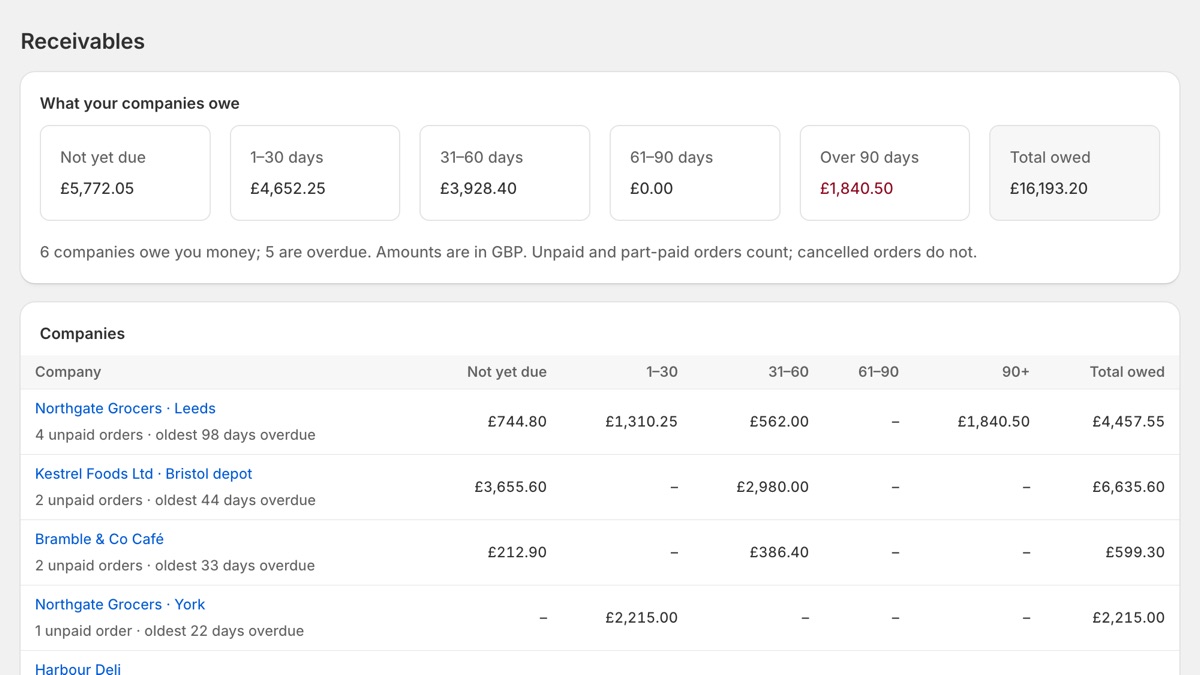
See what every company owes
Remit reads your unpaid B2B orders and groups them by company and by age: not yet due, 1–30, 31–60, 61–90 and over 90 days.
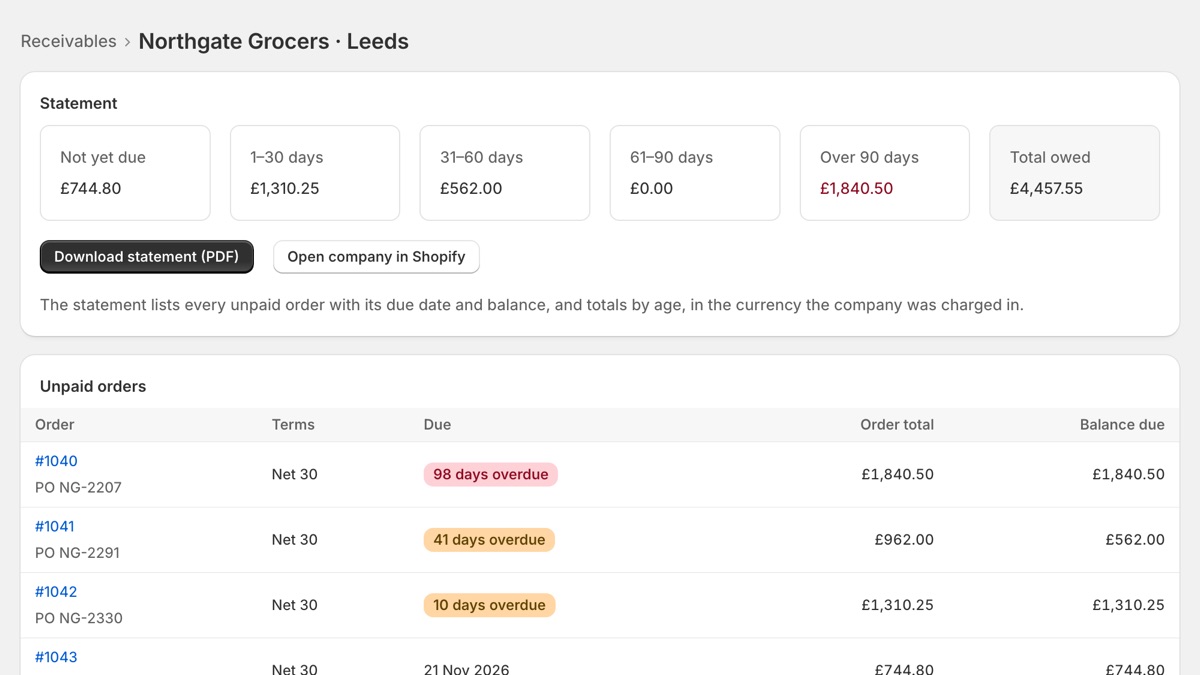
Open any company
Every unpaid order with its terms, due date, days overdue and balance. One click opens the order in Shopify.
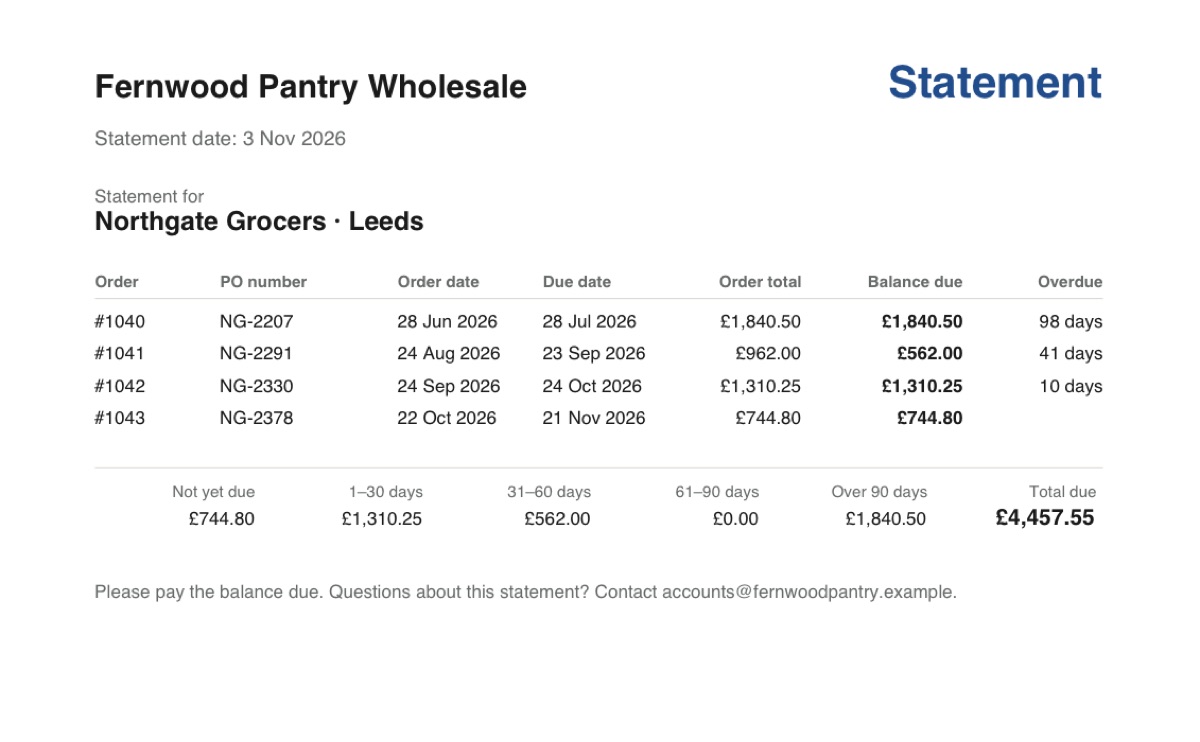
Send a statement
Download a clean PDF statement for the company, in the currency they pay in, and send it with your reminder.
Everything you need to get paid on time
Aging at a glance
Totals for not yet due, 1–30, 31–60, 61–90 and 90+ days.
Per company location
Balances follow Shopify's B2B payment terms, set per location.
PDF statements
Every open order, its due date and balance, with an aging summary.
Multi-currency
Statements use the currency each company was charged in.
Aging report as CSV
For your accountant or your month-end close.
Read-only
Remit changes nothing in your store and keeps no copy of your orders.
Simple pricing
Free
$0
- See what every company owes, by age
- Every unpaid order per company
Pro
$12 / month
- Everything in Free
- PDF statements for every company
- Aging report as CSV
14-day free trial
Billed through Shopify. Change or cancel any time from the app.
Questions
Which orders does Remit count?
Orders placed by a B2B company that are unpaid or part-paid. Cancelled orders and retail orders are left out.
How is an order's age worked out?
From its due date: the first unpaid instalment of its payment terms. An order without terms was due when placed. 'Due on fulfillment' orders count as not yet due until you fulfil them.
Do I need Shopify B2B?
Yes. Remit works with the companies and payment terms of Shopify's built-in B2B, which is part of the Basic, Grow, Advanced and Plus plans.
Does Remit change my orders or email my customers?
No. Remit only reads. You download the statement and send it yourself, and you mark orders paid in Shopify as usual.
What happens to my data if I uninstall?
Remit stores no order or customer data. Shopify asks Remit 48 hours after uninstall to delete what it holds about your store, and Remit deletes it. The privacy policy has the details.
Something else? Email support@tidymerchant.com.
Stop chasing payments from memory
Install Remit and see what every company owes in a minute.